
SMUG meeting, July 19, 2022
Meeting notes by Kathleen Charters
At last month’s meeting, several individuals suggested they wanted to talk about getting rid of clutter in their downloads folder, Desktop, and various other places. This is a splendid idea. Here we have a cluttered desktop:
A cluttered desktop. Really cluttered. Cluttered to the point of being unusable.
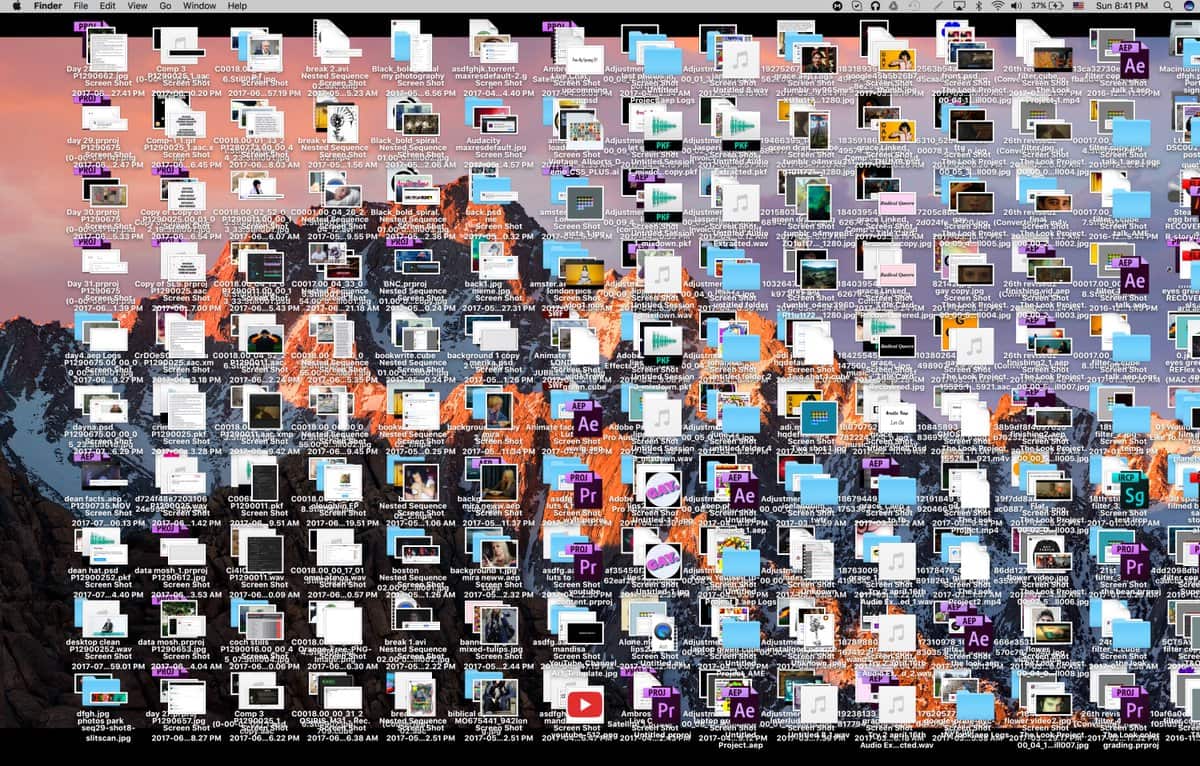
Clutter on your computer has several bad side effects:
- You can’t find anything.
- You run out of disk space. This is bad. Very, very bad.
- It slows your computer. Sometimes to the point of being either unstable or unusable.
- You can’t do anything.
- Did we mention you can’t find anything?
As a point of information, the worst example of desktop clutter ever witnessed by the SMUG Vice President had 42,891 items (files, folders, aliases) on the desktop. It was a relatively modern Macintosh, and it took 11 minutes to boot and draw the desktop. It took the better part of two days to clean it up, and free up around 350 gigabytes of disk space.
Q&A
Submitted registration and did not get a verification; Lawrence will follow up
FaceBook e-mail friend request, knows the person, confirms as friend, then gets generic questions and this looks like a scam; recommend to not use actual year for Date of Birth to decrease possibility of spam; recommend to not make public your e-mail address; with name and DOB can get SSN and risk identity theft; Fake Friend requests for advertising, hijack FaceBook accounts from people who have died; Recommend do not use the same password for everything as this can be used to get access to accounts and pretend to be someone else; recommend be paranoid; get friend requests from friends of spouse/relatives; Russia uses FaceBook for espionage to plot group movements based on Service Member posts; recommend to quit conversation if apparent you do not know the person; Recommend go to the profile of the person requesting to be a Friend and if it is empty, delete them; Recommend if know person and have their e-mail you can e-mail them and ask if the Friend Request came from them; also may get messages meant to go to someone else due to incorrect e-mail address used by that person; half of the financial crimes target those over 60 years old
iPhone 7 Plus, at the end of support, needs to get a new phone. Should the person wait for the iPhone 14? Base decision on capability needed, anything older than iPhone X you should think about getting a new phone; consider the privacy and security services available on a newer iPhone due to use of enclave to store personal sensitive information, faster wireless carriers, faster processing, better zooming capability, battery life is better, ability to automatically switch radio bands as travel across country to get better coverage; Apple rolling obsolescence due to changes in infrastructure, for example the end of 3G service meant many old iPhones stopped working as phones; when new iPhones come out they are always backordered, iPhone 14 will have a better camera but function is similar to iPhone 12 and 13 (not much difference); consider the iPhone SE for basics, has a plastic case and touch interface; Face ID works well even with a mask; to switch from current caller to a new caller there is a button on the screen; wide angle .5X, 1X, 2.5X options – take photos to see comparison; things far away still look far away
AT&T messages – no account with them for years; scammers may reach out to verify the account is real; Recommend delete or mark as spam; may be direct TV marketing for AT&T; iMessages showing numbers, delete as they come in; can mark e-mail as Junk
Places to try iPhone models: Tacoma Mall Apple Store; Alderwood Mall Apple Store, University Village Apple Store; Apple Store employees do not work on commission and will do the data transfer and get the phone account set up; local phone stores are limited in selection and what they can do; can buy online from Apple Website and have iPhone delivered to home but have to do own data transfer; can make an appointment at the Genius Bar to get the data transfer and phone account set up
Business Meeting
Signup sheet URL in Chat window
President and Treasurer – nothing new to report
How Do You Clean Up Your Mac – visual demonstration
Desktop – cluttered with stacked files, this slows things down; when machine crashes a core dump occurs size 2.3-4.2GB; delete these to make more room; create “Clutter” folder and drag and drop the files; Preferences: turn on Hard Disk; under View: Show Toolbar, Show Tabs, Show Paths, Show Status; can get a list of files rather than icons
Alternative for newer Macs: View: select Use Stacks and will group desktop files by types of files; drag into “Clutter” folder; can also sort by name, by date, etc.
Recommend – do not put files on the Desktop; this slows the boot-up process
Downloads folder – right click and select List; or right click and select Open; keep as empty as possible, ideal is 7 or fewer items; TOT – stickies, free, can copy and paste into this application and delete the text file; Web clipping – Web Address, can bookmark; Safari has the Reading List option which shows the name of the Website and stores the URL, can manually organize, can create folders (for example categories); can manually alphabetize by dragging the URL to the desired location; can color code items, for example blue for backed up file and red for files not backed up; under view can sort by tags (colors)s; can use view to see the path for a file; can turn on date modified and date created to view and then can sort based on this; many ways to sort to increase organization
Clean up by naming the file so know something useful about it; select the file name and type in a new meaningful name; it will sort according to the characteristic selected.
Most things go under the Documents folder
Can group by type: for example, Music files go into music
Photos – use Photos app, select import, and it will import anything you select; Photos can organize by date, type of photo, images in photos; alternatively, select .jpg files from Clutter folder and drag and drop into Photos to import them, then you can delete from Clutter folder
Export from Photos to a folder on desktop for project; when done put copy of original in folder by project name; will still retain original photos in Photos; alternative – Adobe Lightroom for serious photographers; can add metadata – a title, location, iPhone photos retain GPS location and date photo taken as metadata; will index this so can search for it; select Places folder to see map with locations of where photos were taken; the more photos in the Photos application the better the application learns how to organize; Photos does the same thing on iPhone
.dmg – downloaded digital packages for programs; create a Software folder inside the Documents folder, then drag and drop the .dmg files there; may not want to keep all .dmg files; will need the original file if need to patch that program
.pdf – create a PDF folder, then drag and drop all the .pdf files into the PDF folder; can create specific descriptive names for additional folders to organize the files
The computer will be slow if no room. Can empty trash to free up room; recommend emptying trash often

Recommend: Keep one folder on the Desktop at a time for the current project only
If you get a message from someone you do not know and want to stop them, select the i button and then select Hide Alerts
Sending a movie by Messages – a large file, movies accumulate over time, taking up a lot of space. can delete videos without losing the message string; to export message string, copy and paste into Notes; alternative is Pages, but Notes takes less room and can put everything in one place while taking up less room
TOT – download for free, can classify files or folders by color
Importing images – Photos can import all .jpg/.pict/.TIFF (image) files from a folder with different types of files, but this will take more time; quicker to point to a folder with only the files you want imported (for example, remove .pdf files from the image folder)
GB fiber optic capability is not available in Sequim. We have slow bandwidth, so boot-up is slower. The downside of saving everything to iCloud is trying to access it across a slow network
iOS as type will give alternative suggestions, select what you want from the list, or select the close button to make the suggestion go away
Autocorrect is crowdsourced, learns, and space bar to continue keyboard shortcuts (for example, signature line)
Microsoft Office – new Excel, huge files, computer shuts off (crashes) then comes back on, when it starts up, grinds; send crash report to Apple; select all text in crash report and save as a document
Cookies: Apple did not allow cookies to do invasive things; Recommend: limit the amount of information you will share; it can record e-mail, IP address, say “no”; Set preference in browser; Safari has private viewing mode does not allow any tracking so have to type everything in and nothing is remembered; Google has Incognito mode – most browsers have this
Documents in iCloud – if copy down the files from iCloud selectively, they will still be on iCloud Drive which shares on all devices; if want on computer can select and drag and drop onto iCloud use option key to make a copy; can have in both places or can selectively put what you want to share; if synch everything to iCloud will have more computer space free but have to fetch everything from from the Internet
Old iPhone – give to a relative if not obsolete; Apple has directions on how to erase; if obsolete, recycle; can keep as not a phone but a reading platform
Topic for next month
iCloud – select one aspect: practical uses, photos, iCloud Keychain, universal services for all devices
Astound – how to get good services? Community Internet and state law to prohibit (telecom lobbying – they want to be the gatekeepers); service comes from franchise agreement – can complain not living up to franchise standards
Net Neutrality – how to get this?
Washington, DC has gigabit fiber